WordPress YouTube Gallery plugin

Showcase YouTube guides and product videos on your WordPress website to boost visibility, engage viewers, and drive more leads and sales.
4.8 rating
10,000+ reviews
Free plan available
Create Widget for Free
No credit card needed
WordPress YouTube Gallery plugin

Create your YouTube Gallery plugin

Configure your YouTube Gallery and add it to your SWordPress website for free!

Screenshots

WordPress YouTube Gallery plugin
1 / 6

Embed YouTube Gallery on WordPress with the Elfsight widget

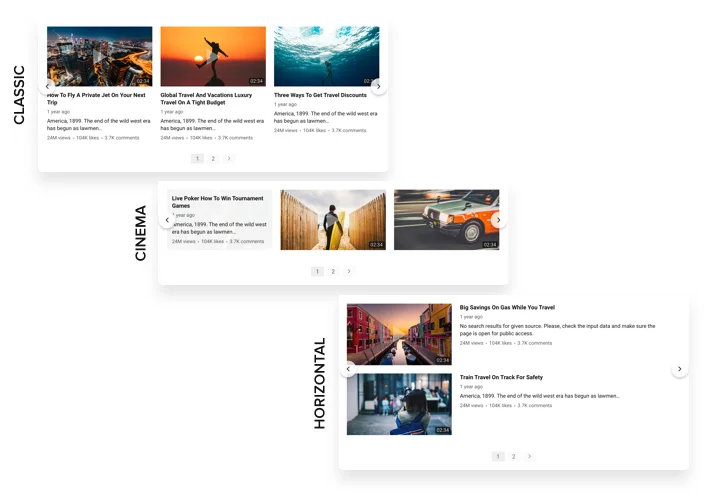
A multi-purpose Gallery for YouTube, which allows adding any videos on your website. Choose the best channels and separate video clips to collect your own playlist and show right on the page using the most suitable layout (video gallery, portfolio, channel, single video). Our widget is totally adaptive for any devices and platforms, it has approximately 100+ setting parameters, flexible templates and a lot of other advantages that help you to create an amazing Youtube Channel plugin for your WordPress website.

Create a personalized YouTube Video Gallery for higher engagement of your users.

  • Strengthen interaction with the audience of your website via YouTube videos
    Entertain your website clients with amazing video content from YouTube and keep them involved more than earlier.
  • Attract more enquiries with video content
    Insert promo videos, reactions, overviews, guides and more to provide to the audience detailed info about your conditions and convince them to perform a transaction.
  • Top fans for your YouTube account
    Convert website users into your subscribers on YouTube. Give an instant and easy way to check videos and subscribe right from the resource.

Main features of the YouTube Gallery widget

The features of Elfsight plugin, which turn it into the best tool to display YouTube playlists and videos on a WordPress website:

  • Unlimited sources;
  • Customizable widget size;
  • Switchable header with three predefined layouts and customizable header elements (logo, banner, channel name and other);
  • 5 embedded color schemes;
  • Content customization options: columns and rows, gutter; horizontal or vertical direction and many more;
  • Regular live updates;
  • Premium support with any issue by a professional team.

Check out all the traits in the free Elfsight configurator

How to embed YouTube plugin on WordPress website?

Follow these simple steps, there no any coding skills required. Total setting up time is less than 2 minutes.

  1. Open our free editor and start creating your personalized plugin.
    Choose the preferred look and features of the widget and save the changes.
  2. Get your unique code exposed in the window on Elfsight Apps.
    After the widget modification, copy the code in the appearing window and save it for a future occasion.
  3. Begin using the WordPress YouTube Gallery on the website.
    Place the code you’ve saved recently on your website and apply the improvements.
  4. You’re done! The installation is successfully accomplished.
    Go to your website and have a look at how’s the widget’s operating.

Having trouble installing or setting up YouTube playlist plugin? You can write to the Elfsight Support team with any questions at any time of the day.

Can I use the YouTube Gallery plugin with my WordPress theme?

Yes, the plugin works with virtually all WordPress themes and can be added to pages, posts, sidebars, or template areas without complex configuration.

Is the YouTube Gallery compatible with popular WordPress builders?

Absolutely. The plugin integrates smoothly with builders like Elementor, Gutenberg, Divi, and WPBakery using blocks, shortcodes, or HTML elements.

What YouTube sources can I connect in WordPress?

You can display videos from a full YouTube channel, a specific playlist, or a single video. Multiple channels and playlists can also be combined into one gallery without limitations.

Can I organize videos into separate categories?

Yes, using the Source Groups feature, you can divide videos into titled sections, creating a structured and easy-to-browse gallery on your WordPress website.

Will newly uploaded videos appear automatically in WordPress?

Yes, the plugin automatically syncs with your selected YouTube sources. It refreshes approximately every 24 hours, so new uploads usually appear within a day.

Can I add a YouTube channel using its @handle link?

Yes, simply paste the channel’s @handle URL (for example, https://www.youtube.com/@YourHandle), and the plugin will load the channel’s videos just like with a standard URL.

Are YouTube Shorts included in the gallery feed?

Shorts are displayed by default if they’re published on your channel. To exclude them, you can use a custom playlist or manually add selected video links.

How do I display a specific YouTube playlist in WordPress?

Add the playlist URL as a source in the plugin settings. The gallery will then show all videos from that playlist in the same order as on YouTube.

Does the plugin include a subscribe button?

Yes, you can enable a YouTube button in the gallery header that redirects visitors to your channel. Subscribing happens directly on YouTube, not inside the plugin.

Is there a search function within the gallery?

Yes, you can activate a built-in search bar that allows users to find videos by keywords among the displayed content.

Can I change the gallery interface language?

Yes, the plugin supports multiple languages. Selecting your preferred language in the settings will automatically adjust all default interface labels.

Pricing

14-day money back guarantee. Risk-free, you can cancel at anytime.
WordPress plugin
Cross-platform software that suits for any website
from $0 / month
start with free plan
Unlimited websites
Dedicated company support and well documented
Free installation help
Special price for multiple apps